pau. 3.0 came out on November 11. It’s a big update, and most of it is in two places: the brushes, and what you can color.
Until now, every page in pau. came from us. That’s still the heart of the app, and four new hand-drawn pages still arrive every Friday. But plenty of people draw on paper, or have a page they want to color that isn’t in our library, and there was no way to bring it in. In 3.0 there is.
The brushes got the most work. There are 57 now, and the painting ones mix the way paint does.
Everything below is in the update. Some of it is free and some needs Premium or the new one-time purchase. I’ve marked which is which as I go.
57 brushes that mix like paint
The brush library now has 57 brushes, across pencils, charcoal, ink, gouache, oils, watercolor, airbrushes, and textures. Hard Round, Soft Round, Fineliner, and Marker are free, along with Fill. The other 53 come with Premium or Unlock All Tools.
The bigger change is how the painting brushes behave. On most screens, blue worked into yellow turns grey, because the app averages light. In pau. 3.0 the supported painting brushes mix like pigment, so it turns green. They also pick up a little of the color that’s already on the page, and Apple Pencil pressure decides how much paint a stroke loads. That’s what lets watercolor pool into wet edges, glazes build up in layers, and thick paint break up dry over the paper texture.
Smudge is gone. In its place is a Blend menu with three tools: Gouache Blender, Textured Blender, and Watery Brush. Each one moves paint you’ve already laid down in a different way.
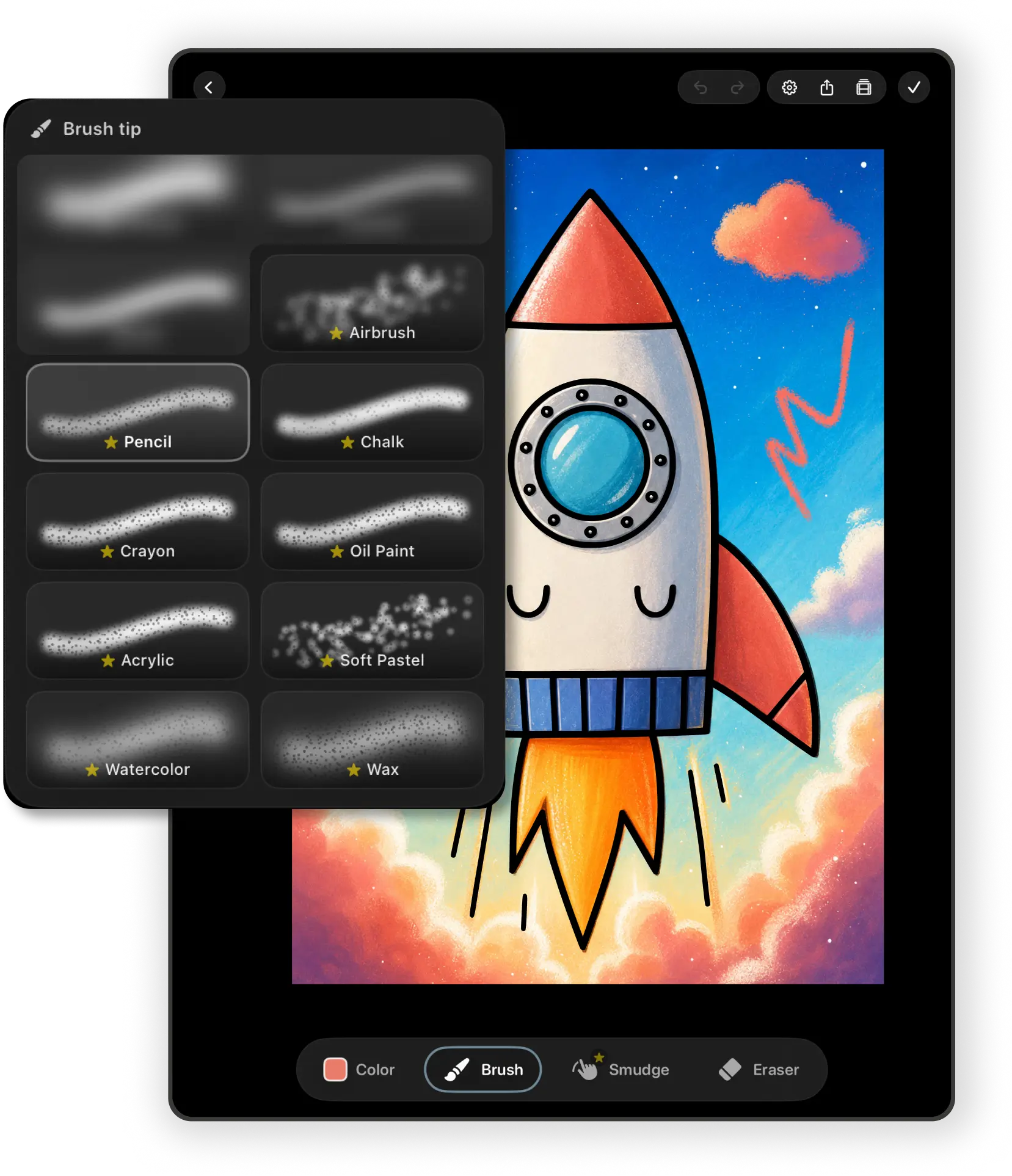
Fifty-seven brushes in one long list would be hard to use, so the library is now sorted into Pencils, Ink, Paint, Watercolor, and Texture, with Essentials, Recent, and Favorites at the top. Each brush shows a stroke preview. The eraser picker works the same way across 11 eraser tips.
A smaller change you’ll notice while coloring: every brush, eraser, and blender remembers its own size and opacity or strength. Switch from a fine pen to a wide wash and back, and the pen is still fine. Size control is also more precise at small sizes, where a step or two matters most.
If you made artwork with the old brushes, it’s safe. Pages and time-lapses recorded with retired brushes still open and replay as they did.
Pages of your own, not only ours
There are now four ways to make a page yourself, plus a way to copy one.
Scan a drawing. Point your camera at a drawing on paper, or pick a photo of one. pau. crops it, corrects the perspective, and turns the lines into a page you can color. You can adjust how strong the ink looks and close small gaps in the lines first, so Fill doesn’t leak. Scanning is free and everything happens on your device.
Make a mandala. Choose petal or geometric patterns, between 4 and 20 symmetry sectors, and 2 to 7 rings, preview it, and save. Also free.
Start from a blank canvas. Draw whatever you like from Home, Library, or My Works, and name it when you mark it finished. Region clipping is off here, since there are no lines to clip against.
Import a coloring page. Bring in a PNG, JPEG, HEIC, or TIFF image up to 25 MB from Photos or Files, preview the converted page, and save it. This one needs an internet connection: pau. sends the image to our conversion service, which traces the lines and sends the page back. The image isn’t stored, and the privacy policy has the details. Please only import pages you have the right to use.
Blank canvases and import need Premium or Unlock All Tools.
Duplicate works on any artwork, from canvas settings or by long-pressing it in My Works. The copy keeps its own paint, completion status, and time-lapse, so you can try a second palette without losing the first. Duplicating is free.
Everything you make lands in My Works next to the library pages and syncs through iCloud with the rest of your artwork.
Softer outlines and cleaner edges
A new outline-opacity slider fades the page’s lines, or hides them completely, for a softer finished piece. While the outlines are faded, region clipping turns off, since there’s no clear line left to clip against.
Coloring right up to the lines also got better. Fill and brush clipping now sit closer to the outline, including around thin borders and narrow gaps.
On devices with enough memory, the canvas now works at a higher resolution, so artwork stays sharper when you zoom in. Smaller devices keep the lighter setting. Home, the catalog, settings, and the workspace controls were also reworked for iPhone, iPad, and narrow layouts.
You can pay once now
Until 3.0, the only way to get the full set of tools was a Premium subscription. Some people would rather not subscribe to a coloring app, and that’s fair.
Unlock All Tools is a one-time purchase. It gives you every brush, the Blend tools, blank canvases, page import, custom and photo palettes, and exports without the pau. mark, and you keep them. It doesn’t include the Premium page library, which stays part of the subscription along with every weekly release.
If you already pay for Premium, nothing changes: it still includes all the pages and all the tools. If you buy the tools and later subscribe and cancel, you keep the tools. And if your access to the tools ends, artwork you’ve already made stays in My Works.
What stayed the same
pau. still has no ads and no account. The app is still quiet, the pages are still hand-drawn, and the free version is still something you can use for as long as you like.
If you have pau., update it on the App Store. If you’re new, here’s what’s free and what Premium adds, or read how the brushes work with Apple Pencil.
Frequently asked questions
Is pau. 3.0 a free update?
Yes. Update from the App Store. Your artwork, favorites, and palettes carry over, and pages and time-lapses made with older brushes still open and replay.
What's free in pau. 3.0?
The free pages, Fill, the Hard Round, Soft Round, Fineliner, and Marker brushes, four eraser tips, scanning a drawing, the mandala maker, and duplicating artwork. Exports include a small pau. mark.
What happened to Smudge?
It was replaced by three Blend tools: Gouache Blender, Textured Blender, and Watery Brush. They come with Premium or the Unlock All Tools purchase.
Does Unlock All Tools include the coloring pages?
No. It unlocks every brush, the Blend tools, blank canvases, page import, custom and photo palettes, and exports without the pau. mark. The full page library comes with Premium.
Does importing a page work offline?
No. Importing an image needs an internet connection because the conversion runs on our server. The image is deleted as soon as it's converted. Scanning a drawing works offline and stays on your device.
Which devices does pau. 3.0 run on?
iPad and iPhone with iPadOS or iOS 18.6 or later. Apple Pencil is optional.
Tina Mrak makes pau. at Visoo Labs in Ljubljana.